
Best Desk Accessories 2026: Gear That Earns Its Space
Desk accessories and home office gifts for 2026 that are worth owning. No Bluetooth speakers or RGB mousepads — just gear that lasts.

Leo Vance
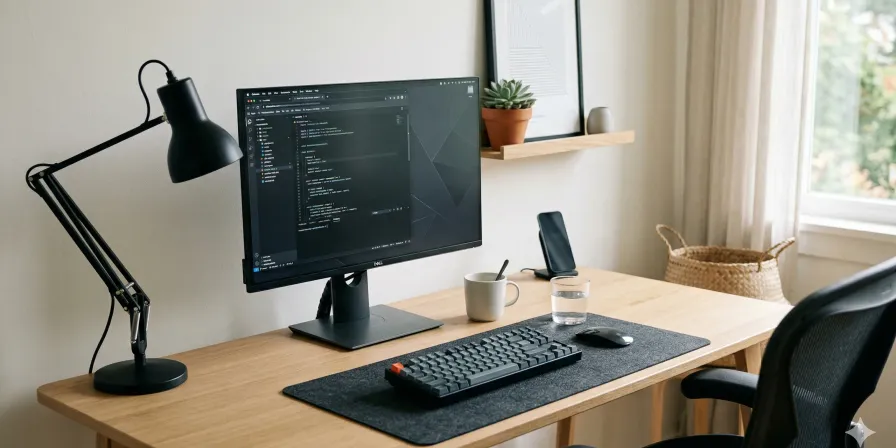
A bad desk setup doesn’t announce itself. It just quietly ruins your posture, your focus, and your willingness to sit down and do the work.
That’s not dramatic. That’s what I’ve observed after years of testing gear in my backyard office-shed and watching friends cobble together workspaces that look fine in video calls but fall apart the moment you try to actually use them for eight hours a day.
The desk accessories category is where most gift guides go to die. They list Bluetooth speakers and USB hubs and call it a day. But the real question isn’t whether something is popular — it’s whether it’s worth the space it takes up, whether it makes the daily experience meaningfully better, and whether it’ll still be worth owning six months from now.
The filter here is simple. If it feels cheap, I don’t care how good the specs look on paper.
Also — I won’t recommend anything that requires a mandatory monthly subscription to function. That is a specific dealbreaker, and I’m not moving on it.
How to Think About Your Desk
I’m going to cover a lot of ground here, organized by category. Here’s the honest hierarchy of desk investments, ranked by how much they’ll affect your daily life:
- Lighting — highest impact, most overlooked
- Keyboard and mouse — tools you touch for hours, every day
- Cable management — unglamorous but it changes everything
- Audio — if you take calls or listen while working, it matters
- Storage and organization — only if it reduces visual noise
- Comfort and ergonomics — long-term health investments
- Personal touches — the stuff that makes a desk feel like yours
The further down the list you go, the more it depends on the person you’re buying for. A monitor light bar is almost universally worth it. A desk clock is only worth it if they’re the kind of person who appreciates a nice clock.
With that out of the way — let’s get into it.
Light It Right
The single most underrated upgrade in any home office. Most people are working under overhead lighting that’s either too harsh, too dim, or pointed at the wrong place. Monitor light bars fix this.
BenQ ScreenBar
This is the one everyone copies and no one has beaten. The BenQ ScreenBar mounts magnetically to the top of your monitor — no adhesive, no clips, nothing that risks your screen. The light is asymmetric, which means it lights your desk without reflecting off your monitor. This sounds like a small thing. It is not a small thing.
I’ve used one for about three years. The auto-dimming sensor is one of the few smart features that actually works — it responds correctly to changing room light, and the dimming itself is smooth, not that awful stepped fade you get from cheaper LEDs.
The physical controls are a metal dial that rotates with just the right amount of resistance. Not too stiff, not too loose. It’s the kind of detail that separates a $150 product from a $40 knockoff that will be on a shelf somewhere by next spring.
The main caveat is the price. It’s not cheap. But the build quality and the fact that it solves an actual problem — not a manufactured one — makes it worth it. If you want the wireless dial version, the ScreenBar Halo adds that and a wider color temperature range. But for most people, the original is the better buy.
BenQ WiT Gen 2 Desk Lamp
For people who need broader desk coverage or work with physical documents alongside their screen, a proper desk lamp still earns its place. The BenQ WiT Gen 2 Desk Lamp has a wider arc than most, which actually matters if you spread papers out.
The gooseneck is metal and holds its position once you set it — something cheaper lamps consistently fail at. The wireless touch panel is elegant and, more importantly, reliable. I say this as someone who’s had touch controls fail on three different lamps from other brands.
The matte aluminum finish looks good on any desk without being a statement piece. It’s just a lamp. That’s the point.
The Input Layer
Keyboards, mice, and trackballs. These are the tools you interact with for the majority of every workday. The quality difference between a decent one and a bad one is felt every single day.
Keyboards
Logitech MX Mechanical
The Logitech MX Mechanical is the right answer for most people. Full-size layout, mechanical switches, wireless, and a price that doesn’t make you flinch. The brown switches give you a tactile bump without being loud enough to annoy a roommate or a Zoom call.
The battery life is what Logitech claims, which is to say — it actually is. About two months with backlighting on, longer without it. USB-C charging, which is the only acceptable answer in 2026.
The aluminum top case adds a surprising amount of rigidity and heft without being heavy. It doesn’t shift around on the desk during use, which sounds like a low bar but is something cheaper keyboards fail at consistently.
The one thing I’ll ding it on: the cable that comes with it is charge-only. Just the cable, nothing else. That’s a small oversight on a product this well-designed.
Keychron Q1 Pro
If the MX Mechanical is the practical choice, the Keychron Q1 Pro is the enthusiast one. Full aluminum chassis, hot-swappable switches, and genuinely good knob support for media controls. It costs more and requires more setup, but it is a better keyboard.
Whether it’s twice as good is harder to argue. But if the person you’re buying for already knows what hot-swappable means, they’ll appreciate it.
Mice
Logitech MX Master 3S
The Logitech MX Master 3S is the workhorse. There’s a reason it keeps appearing on every reasonable list — it works, it lasts, and it doesn’t feel cheap after six months.
The scroll wheel is nearly silent and has enough momentum that you can fly through long documents. The ergonomic shape is comfortable for most hand sizes, and the battery lasts about 70 days in real-world use. Not 70 days on paper. 70 days.
The right-hand-only design means lefties are out of luck. Also, the thumb buttons are positioned a bit far back — if you have smaller hands, they require a stretch.
The USB-C charging means no proprietary cables floating around. That’s worth noting explicitly because Logitech used micro-USB on the previous version for way too long.
Logitech MX Anywhere 3S
The portable alternative. Smaller, lighter, and it lives in a bag without complaint. Same 8K sensor as the 3S, which tracks on glass and textured surfaces — useful if you work from unusual locations.
For smaller desks or smaller hands, this is the right call. The scroll wheel lacks some of the Master 3’s satisfying momentum, but the trade-off in portability is worth it for a lot of people.
Logitech MX Vertical
For RSI-prone wrists or anyone who wants to try something different, the Logitech MX Vertical’s upright grip takes about a week to stop feeling weird. Once it clicks, it clicks. The reduced forearm strain during long sessions is real.
It’s heavier than a standard mouse, but weight in this context reads as stability — it doesn’t shift during use.
Kensington Expert Trackball
The wildcard. The thumb-operated trackball is a different paradigm entirely. No arm movement. The ball glides with almost no resistance and the pointer control is surprisingly precise once you develop the muscle memory.
The metal base plate has enough weight to stay planted. The build quality is the kind that suggests it’ll still be working in a decade. It is, however, a commitment — this isn’t something you buy on a whim and use immediately.
Sound Decisions
Desktop audio is one of those categories where most people settle for something that “works” and then wonder why calls sound tinny and music feels flat. These don’t.
Kanto TUK
The Kanto TUK is the answer if you want speakers that sound like they belong on a proper desk and not in a college dorm. The 5.25-inch aluminum drivers and AMT tweeters are specs you’d expect from audiophile equipment, not computer speakers.
What sets it apart is the USB DAC — you connect your computer directly and skip the inferior internal sound card entirely. The DSP modes let you adjust the sound profile for your room, which sounds gimmicky but actually works.
After testing with acoustic tracks and orchestral recordings, the soundstage is wide and the imaging precise. These are not powered computer speakers that happen to sound okay. These are compact speakers that happen to work with a computer.
The trade-off: they’re not wireless. You will run speaker wire. For some desks, that’s a routing challenge. For most, it’s worth the sound quality.
Kanto YU2
If the TUK is too much speaker for the space or the budget, the Kanto YU2 is a solid step down. 3.5-inch woofers and smaller cabinets, but the same build quality philosophy. They sound warm and forgiving, which is the right character for a desk speaker you use all day.
Shure MV7
For people who take calls or record anything, a dedicated microphone is a meaningful upgrade. The Shure MV7 connects via USB or XLR — USB for simplicity, XLR if you’re building a serious audio chain later.
The sound is warm and present, the auto-level mode is genuinely useful, and the metal body has the kind of weight that tells you it was built to last. The adjustable yoke mount is well-designed and holds position without drama.
The one thing to know: certain settings require the ShurePlus MOTIV app. The defaults are fine for most people. Once you’re in the app, you have more control over tone and gain, which podcasters and voice-over people will appreciate.
Skip the Elgato Wave:3. The software mixing is clever. The sound quality isn’t. It has a thin, midrange-forward character that doesn’t hold up next to the MV7, and the front-facing mute button is an awkward placement.
The Cable Problem
This is the unglamorous part. Most people try to fix their cable situation with organizers instead of reducing the number of cables in the first place. Start there. If you have three power bricks visible, ask yourself if a USB-C hub could replace two of them.
CalDigit TS4
The CalDigit TS4 is the answer if you want the best Thunderbolt dock available. Not the cheapest, not the most feature-dense on paper — but the one that works. The TS4 has 18 ports that all function reliably, dual monitor support at full resolution, and 98W charging for your laptop over a single cable.
I’ve been using one for about two years. The build quality is exceptional, the ports don’t degrade, and there’s no bloatware. Just physical ports that do what they’re supposed to do.
It runs warm. This is normal. It is not a sign of failure.
The price is $400, which makes people hesitate. But if you spend any amount of time connecting and disconnecting devices, the daily tax that the TS4 eliminates is worth it. The question isn’t whether you can afford it — it’s whether your time is worth it.
Anker 555 is the budget alternative. 12 ports, most of what most people need, about half the price. The USB-A ports can be tight with larger connectors, but that’s a minor complaint.
Cable Management
Once the hub situation is sorted, the actual cable routing:
Adhesive cable clips — I dismissed these for years. They’re cheap. They work. The 3M adhesive holds on wood, metal, and painted surfaces without peeling. I use these now. I was wrong to dismiss them.
Braided cable sleeves — for bundling multiple cables together. The Keysmart Cable is my go-to. It compresses well, doesn’t fray, and the velcro closure is actually durable. No more zip ties.
Under-desk cable tray — the simplest solution is often the best. Something like the Cablevin Under Desk Cable Management Tray keeps the excess off the floor without overthinking it. Make sure it’s wide enough. Measure twice.
Desk Storage and Organization
The goal here isn’t more storage. It’s less visual noise. Every organizer you add is a surface that will eventually accumulate things.
Rain Design mStand
The Rain Design mStand is the monitor stand that earns its space. Aluminum body, weighted base that doesn’t shift, and a cable management hole that looks small but changes the cable routing completely.
The storage underneath is the part people overlook. That dead space under your monitor becomes useful — a wireless keyboard when you’re not using it, a notepad, whatever. It turns wasted space into functional space.
This is one of those things where the spec sheet looks boring and the physical product is quietly satisfying. The machined aluminum matches a MacBook exactly. It is, I recognize, a very specific kind of joy.
Grovemesa Wooden Desktop Organizer
For people with more to organize — notebooks, tablets, cables, small devices — the Grovemesa Wooden Desktop Organizer is solid walnut with no veneer, no particleboard, no shortcuts. The compartments are sized well and the finish is clean.
The risk with desk organizers is that they become justification for accumulating more stuff. If the person you’re buying for has a minimalist streak, maybe skip this and go with the mStand. If they have things to store, this won’t fall apart.
Comfort and Ergonomics
The investments that say “I care about your long-term health” without being clinical about it.
Fully Jarvis Monitor Arm
Monitor arms are one of those things that seem unnecessary until you use one. Then you can’t go back.
The Fully Jarvis Monitor Arm supports a wide range of monitor weights and sizes, and the adjustable tension means it won’t slowly sag over time — which is the most common failure mode in cheaper arms. The cable management is built in, and it holds position well once set.
The one caveat: for heavy monitors, the Fully Jarvis at its price point is the right balance. If you’re mounting something under 10 pounds, cheaper arms work fine. Over that, pay for the reliability.
3M Precise Mouse Pad
Most footrests slide across the floor when you try to use them. The 3M Precise doesn’t. The textured surface holds your feet in place, and the five-degree incline is noticeable enough to matter without being distracting.
This is one of those things that seems too simple to matter until you use it and then you realize you’ve been sitting wrong for years. The build quality suggests it will outlast whatever desk it lives under.
3M Kingston Wrist Rest
The keyboard wrist rest that doesn’t quit. Most wrist rests fall into one of two categories: too hard or too soft. The Kingston’s memory foam compresses evenly without bottoming out against the hard surface underneath.
The 3M Kingston Wrist Rest has a Lycra cover that doesn’t peel at the edges — a failure I’ve seen on three other “premium” wrist rests. The weight keeps it planted on the desk even during aggressive typists. And at $30, it’s not even a significant investment.
Small Things That Matter
The personal touches. The things that make a desk feel like someone’s actual workspace instead of a product photoshoot.
Kreafunk aGreen Magnetic Notebook Holder
For someone who actually uses a notebook, a good holder changes how often they reach for it. The Kreafunk aGreen Magnetic Notebook Holder uses genuine leather — thick, vegetable-tanned, the kind that develops a patina instead of cracking. The magnetic closure has a satisfying snap.
The A5 format works for most people. After six months of use, the leather has settled into something that looks intentional rather than worn. At $50, it’s priced for what it is.
Budget alternative: The LEONTIJES Wooden Notebook Stand in walnut. Less luxurious, less expensive, still well-made. The walnut has aged nicely after a year on my desk.
Lamy 2000
A fountain pen that looks as contemporary as it did in 1966. The Lamy 2000 has a brushed aluminum body that’s substantial in the hand — not heavy, but weighted. The Makrolon section provides grip without feeling like rubber. The piston filler means no cartridge nonsense.
The medium nib runs a bit broad, which matters if you have small handwriting or prefer fine lines. The Lamy Safari is a better entry point if you’re not sure — same philosophy, lower price, more nib options.
If you buy one of these for someone who writes by hand, they’ll use it. That’s the test.
Lemnos Te Desk Clock
An analog clock for the desk. I know — everyone checks time on their monitor or phone. But a good desk clock is a different thing. It’s a visual anchor. It’s a detail that makes a desk look considered.
The Lemnos Te Desk Clock is a Japanese quartz clock with a solid aluminum case and a face that has exactly what it needs: a second hand and hour markers. No branding, no extra numerals, no decorative nonsense. Silent operation — no ticking.
The matte white version with a white dial is the one I’d buy. It disappears on most desks, which is the right thing for a clock.
This is the least essential thing on this list. It’s also the one that makes people ask about it most often.
Quick Reference: The Short List
If you’re shopping for someone who needs a complete upgrade, here’s the priority order:
| Category | Best Value | Best If Price Is No Object |
|---|---|---|
| Lighting | BenQ ScreenBar | BenQ ScreenBar + BenQ WiT Gen 2 |
| Keyboard | Logitech MX Mechanical | Keychron Q1 Pro |
| Mouse | Logitech MX Master 3S | Kensington Expert Mouse |
| Audio | Kanto YU2 | Kanto TUK |
| Microphone | Shure MV7 | Shure MV7 |
| Storage | Rain Design mStand | Grovemesa Wooden Desktop Organizer |
| Ergonomics | 3M Kingston Wrist Rest | 3M Precise Footrest |
| Cables | Under-desk tray + clips | CalDigit TS4 + braided sleeves |
| Personal | Lemnos Te Clock | Kreafunk aGreen Notebook Holder |
The Actual Point
Every product on this list earned its space by making the daily experience better. Not by being exciting. Not by having good marketing. By doing its job without becoming a problem itself.
That’s the test. Buy less, buy right.
If you’re buying for someone else, lighting and keyboard+mouse are the two categories where you’ll get the most gratitude per dollar. But if they already have good lighting — the personal touches are where you signal that you actually know what they care about.
That’s the difference between a gift and a present. A present is something wrapped. A gift is something considered.

Leo Vance
I review gear based on a simple philosophy: if it feels cheap, it is cheap. Let's find you something that won't break by next Tuesday.